
Setting up a ForgeRock Access Manager instance for production may be a cumbersome task as instructions to harden the instance for production may be located all over the documentation.
This post aims to consolidate all the hardening recommendations with more detailed steps and short video guides to achieve them. Ultimately, being the go to reference for how to harden an AM instance.
Note that this post will include some of the recommendations on both ForgeRock documentation and from our own experience. We will be using the latest version of AM as of this post, 6.5.2.3.
If you are here just for the checklist, you can download it by clicking here.
/am Or /openam As Deployment PathIMPORTANCE: BASELINE
Because this is a well-known path for AM, it will be easy for malicious hackers to crawl a domain for it. During installation, rename the war file to a path where it does not seem like ForgeRock AM.
Rename the war file to something that is not obvious.
amadmin Super Admin UserIMPORTANCE: BASELINE
It is insecure to continue to use amadmin user to configure AM as there will not be accountability. This will guide you through the creation of users and groups with privileges similar to amadmin user.https://www.youtube.com/embed/NNHNl1_v8qw?feature=oembed
Realms > [Realm Name] > Identities, click Add Identity and enter details for the userRealms > [Realm Name] > Identities > Groups, click Add Group and enter an ID for the groupRealms > [Realm Name] > Identities > Groups > [Group Name] and add the user you selected/created in step 1 as a memberRealms > [Realm Name] > Identities > Groups > [Group Name] > Privileges and enable the required privileges. For full read and write access (including via the REST API), enable Realm Adminamadmin To A Strong OneIMPORTANCE: RECOMMENDED
https://www.youtube.com/embed/BPKwl7wxtyo?feature=oembed
Since amadmin is a default super admin username on all AM instances that can and should not be disabled, it is almost mandatory to set a very strong password.
Although recommended to already have initially set a strong password during initial setup, if you did not, here are the steps to change it later on
amadmin userUser avatar image (top right of XUI) > Change Password.goto And gotoOnFail URLIMPORTANCE: BASELINE
By default, AM redirects the user to the URL specified in the goto and gotoOnFail query string parameters supplied to the authentication interface in the login URL likely to aid in development.
To increase security against possible phishing attacks through open redirect, you can specify a list of valid URL resources against which AM validates these URLs. AM only redirects a user if the goto and gotoOnFail URL matches any of the resources specified in this setting. If no setting is present, it is assumed that the goto or gotoOnFail URL is valid.
When setting valid goto URLs, you can use the “*” wildcard, where “*” matches all characters except “?”
https://www.youtube.com/embed/IhjsY-iXR00?feature=oembed
Configure > Global Services > Validation Servicehttps://www.youtube.com/embed/GVw-Ovx3-RI?feature=oembed
Realms > [Realm Name] > ServicesValidation ServiceIMPORTANCE: BASELINEhttps://www.youtube.com/embed/1eKng_janPM?feature=oembed
By default, the values set are too low to handle high number of connections by ForgeRock AM, it is required to set this to a higher value (recommendation of 65536)
Assuming a Linux system:
su - ${AM_USERNAME}
ulimit -n 65536
cat >> /etc/sysctl.conf <<- EOF
fs.file-max=65536
fs.inotify.max_user_watches=524288
EOFIMPORTANCE: OPTIONALhttps://www.youtube.com/embed/jfBLEZmsi18?feature=oembed
You may want to disable the API explorer meant to help development to create ambiguity. Especially if it was set to dynamic before.
Configure > Global Services > REST APIsDisabled in the API Descriptors drop-down list.IMPORTANCE: BASELINEhttps://www.youtube.com/embed/E4lan89oUic?feature=oembed
Module-based authentication lets users authenticate using specific chain modules with the module=module-name parameter which is only to aid development and must not be enabled in production.
Realms > [Realm Name] > Authentication > Settings > SecurityIMPORTANCE: BASELINE
https://www.youtube.com/embed/Hg8ljPpXlvc?feature=oembed
By default, AM allows the user to choose their authentication service with the service=service-name parameter, this is also only to aid development and must not be enabled in production. You should set specific authentication tree/chain per realm.
Authorization -> Policy Sets -> [Your Policy Set] -> [Your Policy] -> EnvironmentsAdd an Environment ConditionAuthentication by Service for the type/[Realm of Tree]:[Tree Name] to enforce which tree from a realm that the user have to have authenticated against first before being able to access the resourceiPlanetDirectoryProIMPORTANCE: BASELINE
https://www.youtube.com/embed/byH8WkqRaW4?feature=oembed
The default settings for cookies has the name set to iPlanetDirectoryPro. If malicious hackers are able to perform Cross-site scripting (XSS) attacks, they can easily look for that specific cookie name to steal the session data.
Assuming you have not set per server settings:
Configure -> Server Defaults -> Security -> Cookie -> Cookie NameIMPORTANCE: BASELINE
https://www.youtube.com/embed/IeN2sW-Fcx4?feature=oembed
Configuring secure cookies with cookie hijacking protection for CDSSO is recommended, so messages for federated configurations perform signing and encryption as necessary, and AM accesses providers securely (for example using LDAP + StartTLS, or LDAPS to access directory services).
enableUniqueSSOTokenCookie for cookie hijacking protectionConfigure -> Server Defaults -> Advancedcom.sun.identity.enableUniqueSSOTokenCookie to trueConfigure -> Server Defaults -> Security -> Cookie -> Secure CookieIMPORTANCE: RECOMMENDED
https://www.youtube.com/embed/cnT8rZ_vXuo?feature=oembed
You should also set specific cookie domain fully qualified domain name (FQDN) to the only ones you would access AM with so the cookie cannot be accepted on non-whitelisted domains.
Configure -> Global Services -> Platform -> Cookie DomainIMPORTANCE: OPTIONAL
Note that this will cause the XUI to load slower for users as it will be requested from the server everytime.
On the servlet application used, set the headers for all path:
Cache-Control: no-cache, no-store, must-revalidate
Pragma: no-cache
Expires: 0
Set Cache-Control: private on all endpoints that contain /json/ in their path on the servlet application except for the following:
/serverinfo/*
/serverinfo/version
/serverinfo/cookieDomains
IMPORTANCE: RECOMMENDED
https://www.youtube.com/embed/JYolvjGXUdw?feature=oembed
HTTP Strict-Transport-Security header helps to protect websites against man-in-the-middle attacks by enforcing only HTTPS connection
HSTS Policy specifies a period of time during which the user agent should only access the server in a secure fashion. Websites using HSTS often do not accept clear text HTTP.
[Uncompressed AM WAR folder] -> WEB-INF -> web.xml<!-- filter declaration --><filter>
<filter-name>EnableHSTS</filter-name>
<filter-class>org.forgerock.openam.headers.SetHeadersFilter</filter-class>
<async-supported>true</async-supported>
<init-param>
<param-name>Strict-Transport-Security</param-name>
<param-value>max-age=31536000; includeSubDomains; preload</param-value>
</init-param>
</filter>
<!-- filter mapping --><filter-mapping>
<filter-name>EnableHSTS</filter-name>
<url-pattern>/*</url-pattern>
</filter-mapping>
jar -cvf * [Desired name of output WAR file] to compress the folder back to a WAR fileIMPORTANCE: RECOMMENDED
https://www.youtube.com/embed/81OMZU4-o0g?feature=oembed
The X-Frame-Options HTTP response header can be used to indicate whether or not a browser should be allowed to render a page in a <frame>, <iframe>, <embed> or <object>. Sites can use this to avoid click-jacking attacks, by ensuring that their content is not embedded into other sites. Consequently, user-agent not capable of doing TLS will not be able to connect to the site, however this issue is almost non-existent at this point.
[Uncompressed AM WAR folder] -> WEB-INF -> web.xml<!-- filter declaration --><filter>
<filter-name>SetXFrameOptions</filter-name>
<filter-class>org.forgerock.openam.headers.SetHeadersFilter</filter-class>
<async-supported>true</async-supported>
<init-param>
<param-name>X-Frame-Options</param-name>
<param-value>sameorigin</param-value>
</init-param>
</filter>
<!-- filter mapping --><filter-mapping>
<filter-name>SetXFrameOptions</filter-name>
<url-pattern>/*</url-pattern>
</filter-mapping>
jar -cvf * [Desired name of output WAR file] to compress the folder back to a WAR fileIMPORTANCE: BASELINE
https://www.youtube.com/embed/fB5T47eRE_M?feature=oembed
This will disallow JavaScript to manipulate or retrieve the cookie and will help prevent cross-site scripting (XSS) attacks.
Configure -> Server Defaults -> Advancedcom.sun.identity.cookie.httponly property value to true.IMPORTANCE: BASELINE
This can be done either on the servlet application server or the reverse proxy that points to your AM instance.
Since configuring these is out of this post’s scope, we will not be covering it here.
IMPORTANCE: BASELINE
Ensure unused ports are properly protected by the firewall. Using a hardware firewall is recommended, but software firewall like UFW and firewall-cmd is also good to have.
You can deploy a reverse proxy within demilitarized zone (DMZ) firewalls to limit exposure of service URLs to the end user as well as block access to back end configuration and user data stores to unauthorized users.
IMPORTANCE: BASELINE
After securing the server using a firewall, you could use a whitelist system and only whitelist the reverse proxy to connect with the AM port. This will allow more configuration for requests that comes in. Configuring HTTPS and certificates are easier too.
You have wide range of choices like ForgeRock Identity Gateway, Apache HTTPD, HAProxy, Nginx and many others.
Since configuring these is out of this post’s scope, we will not be covering it here.
IMPORTANCE: RECOMMENDED
It is generally recommended to enforce TLS1.2 for communication.
Between AM and one or more of the following:
To enforce the TLS protocol for AM connections with LDAP, use the -Dorg.forgerock.openam.ldap.secure.protocol.version JVM setting.
IMPORTANCE: OPTIONAL
https://www.youtube.com/embed/TcIwAMl6Epw?feature=oembed
If not restricted, users can select the authentication trees they want to use by using the service=service-name parameter. However, if already restricted, this is optional. It is recommended to restrict than just rely on this alone.
Ensure that inner trees do not take in both username and password together will aid to not allow users to use only inner trees to authenticate.
IMPORTANCE: BASELINE
https://www.youtube.com/embed/T_pF_39-wr0?feature=oembed
Create realms for the organization(s) and separate administrative users from end users.
realm=realm-name query string parameterIMPORTANCE: BASELINE
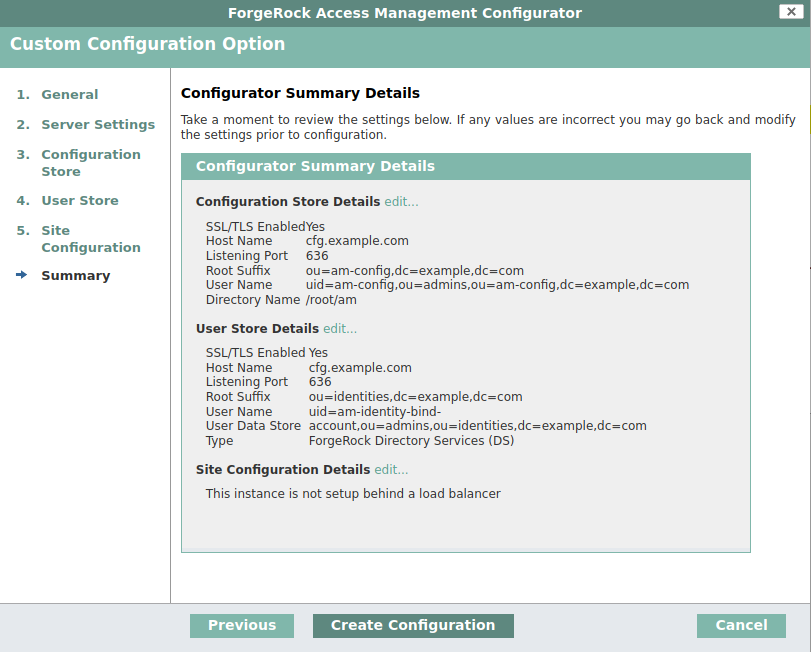
It is not a good idea to bind using the root DN as essentially the account has read/write privileges on the entire LDAP. You should create specific administrative accounts per different base DN and use those instead. This will be covered in the Directory Services post in the future and set up using profiles.
IMPORTANCE: BASELINE
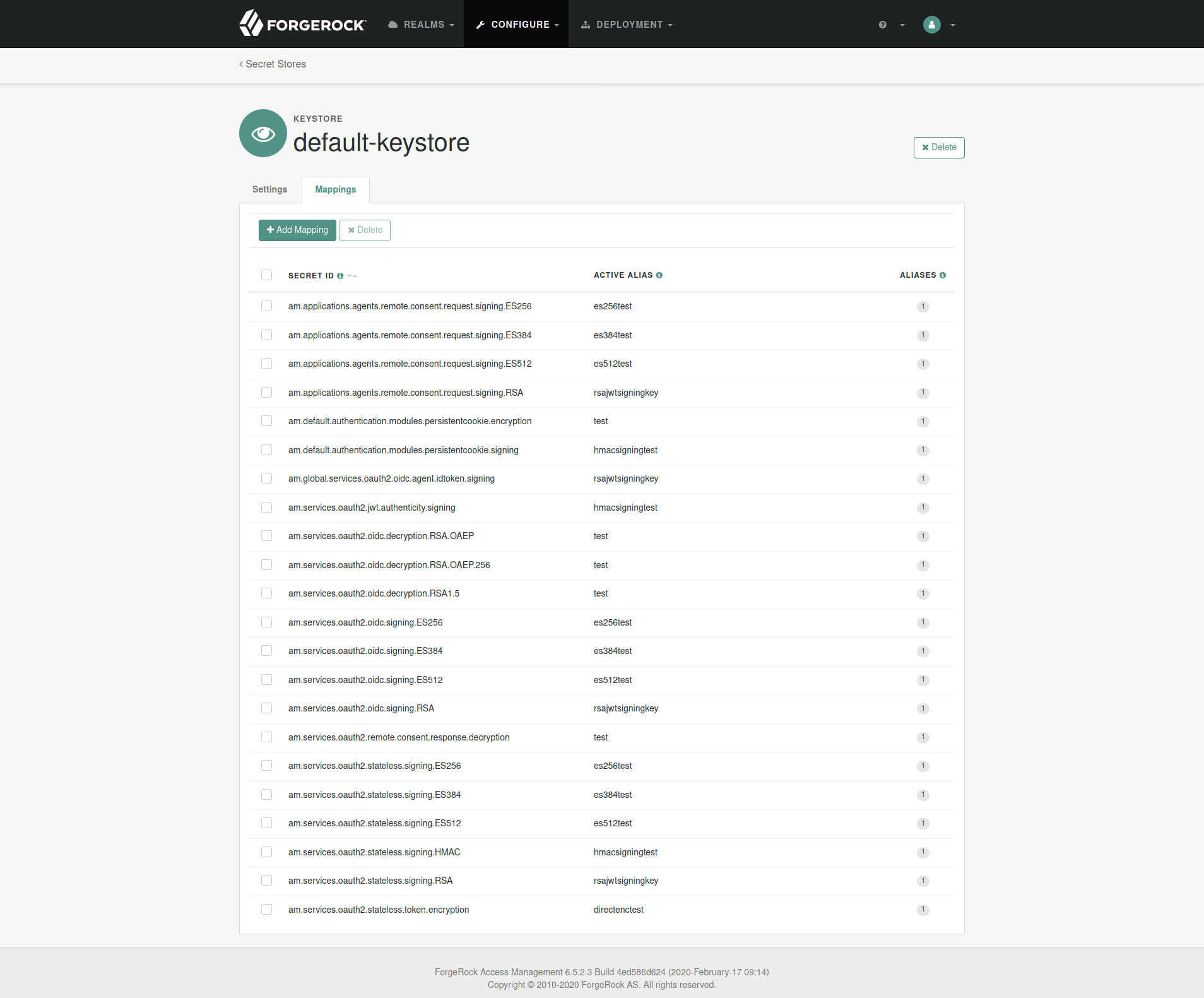
The default keystore that AM uses is located at [AM Config Directory]/openam/keystore.jceks. It includes several test keys that are pre-generated and should not to be used in production.
You should add in your own keys either by a keystore explorer application or keytool CLI and change the reference in AM admin console to point to your key alias.
The store password is a hidden file located at [AM Config Directory]/openam/.storepass which is randomly generated during setup. The password for the keys in the store is always changeit and if changed, you should change it in [AM Config Directory]/openam/.keypass too.
Configure -> Secret Stores -> default-keystore -> MappingsEnsure the servlet application server configuration do not allow encoded slash in the application URL. It should be disabled by default in Tomcat and JBOSS.
XUI will break as it relies heavily on in-line scripts. Unless you are planning to use a completely customized UI, this can not be hardened although it helps protects against XSS attacks.
AM includes a global filter to harden AM’s protection against CSRF attacks. The filter applies to all REST endpoints under json/ and requires that all requests other than GET, HEAD, or OPTIONS include, at least, one of the following headers:
Configure -> Global Services -> REST APIsEnable CSRF Protection is turned onThe list of hardening recommendations can be non-exhaustive, but we have provided the few most important ones that we have come across.
We have consolidated all of this post into a checklist that you can download, print and use for your own deployments, you can download it by clicking here.
We hope that this post was able to help you determine and perform security hardening on your AM instances more efficiently.
The document and content made available by Nebulas Tree in no way conveys any right, title, interest or license in any intellectual property rights (including but not limited to patents, copyrights, trade secrets or trademarks) contained herein. Nebulas Tree reserves the right to vary the terms of the document and content in response to changes to the specifications or information made available to Nebulas Tree.
Nebulas Tree does not assume liability for any errors or omissions in the content of this document or any referenced or associated third party document, including, but not limited to, typographical errors, inaccuracies or outdated information. This document and all information within it are provided on an “as is” basis without any warranties of any kind, express or implied. Any communication required or permitted in terms of this document shall be valid and effective only if submitted in writing. Reliance of any information provided herein this document is solely at your own risk.